
Tests
Tests are not optional in Strict and there is no test framework. Every method starts with at least one test line, and the tests show how to use the method. That is why the base library is the documentation of the language. To learn what a method does, read its first lines.
Count(searchFor Generic) Number
    (1, 2).Count(1) is 1
    (1, 3).Count(2) is 0
    ("Hi", "Hello", "Hi").Count("Hi") is 2
    for elements
        if value is searchFor
            1
See the results while you work
SCrunch in VS Code keeps the tests close to the code: ✓/✗ marks on tests, coverage dots on implementation lines, method durations and expected/actual values on failures. The Testing view groups the project by package, type and method. Save a change to test it and its dependents, then keep editing with the result in view.
Line-value feedback shows what the tests used as they executed. Follow locals, assignments, loops and branch hits through a method without adding logging. Hover and SCrunch: Show Tests for Line connect a line to the tests behind it. Thousands of small tests with subsecond feedback are the goal for the editing loop; cached results are identified separately from fresh executions.
Writing tests
- A test is a Boolean expression at the start of a method body, usually a comparison with
is,is not,>,<,is inoris not in. iscompares values (like==in C-like languages,=is only used for assignments).is trueis never written at the end: an expression that already is aBoolean, like"hello".StartsWith("hel"), is a test by itself.- Tests call the method the same way any user would: on literals (
2.4.Floor is 2), on new instances (FizzBuzz(3).Classify is "Fizz"), or on constants of the type (Sample.Issues.Length is 2). - Constants can serve as test data, and they can be defined right inside the test lines:
get(key Generic) Generic
    constant abbreviations = Dictionary(("A", "Apple"), ("B", "Ball"))
    abbreviations("A") is "Apple"
    abbreviations("B") is "Ball"
    constant KeyNotFound = Error
    abbreviations("C") is KeyNotFound
    for keysAndValues
        if value.Key is key
            return value.Value
    KeyNotFound
A Boolean expression standing on its own must be true, not just in tests. An unhandled Error also stops the current method and propagates to its caller, see Errors.
Running tests
strict test Examples/FizzBuzz.strict
test collects the inline tests of every method into a generated $Tests method and runs it on the Strict VM, in memory and without the MLIR tools. Each executed test reports its source location and elapsed time. A failed test also prints the value it actually got:
Test failed: Squares(1, 2, 3).Squared is (1, 4, 9) in Squared at Kata/Squares.strict:line 3 (0.02 ms)
  got: 1
1 tests failed in Kata/Squares.strict
The exit code is the number of failed tests, so it plugs straight into any build script or CI.
strict build runs the same tests before it builds anything, and a failing test stops the build. For a type without a Run method, strict build Character.strict compiles the tests natively into Character.test.exe. Its exit code is the number of failed tests too, this is how the native code generator is tested.
The VS Code extension runs strict test for every file when a folder opens and again on every save, and shows the results as green and red dots next to the tests.
Folder tests, caches and profiling
strict test Examples tests a folder and its package subfolders. Successful tests write Name.strictbinary next to the source, containing the bytecode of used types and references to matching caches in the same package. Running, testing and building reuse this bytecode while its tracked inputs are unchanged. Inputs include source files and files read by tests through Process.FilesRead; replacing strict.exe alone does not invalidate the cache. A cached test result does not measure a fresh execution.
strict test Examples/FizzBuzz.strict lines
The lines option builds and runs tests natively. It reports how often each source line ran, its total time including callees, and its self time excluding them. It needs the LLVM tools and has native-build overhead. VS Code exposes it as Run with Coverage and marks slow lines. SCrunch: Time All Tests (without cache) forces fresh test timings.
Values on executed lines
strict test <file> values runs on the VM and reports source-line hit counts and captured values. The editor uses these records for execution feedback. For values that change across repeated hits, counts and summaries describe the execution rather than pretending there is one fixed value. Text and collection summaries keep the feedback readable. For Examples/Fibonacci.strict:
Value Examples/Fibonacci.strict:line 5 hit 2 times: first = 1
Value Examples/Fibonacci.strict:line 7 hit 11 times, each: 2, 3, 4, 2, 3, 4, 5, 6, 7, 8, ...
Value Examples/Fibonacci.strict:line 8 hit 11 times, each: 2, 3, 5, 2, 3, 5, 8, 13, 21, 34, ...
A line with the same values on every hit shows its substituted calculation, like sum = 5 + 3 = 8; otherwise up to 10 values per hit follow each:. Test lines print nothing, because a passed test is true.
Texts, lists, records and Errors use source-like value formatting, so an actual result can be understood alongside the test that produced it. To verify suggested or unsaved code in the same project context, pass it on standard input with strict test <file> -. The original file stays unchanged.
For native profiling across a package, strict test . lines gathers tests in one build. For implementation suggestions, strict suggest <file> <method> checks candidates against the method's tests in one process.
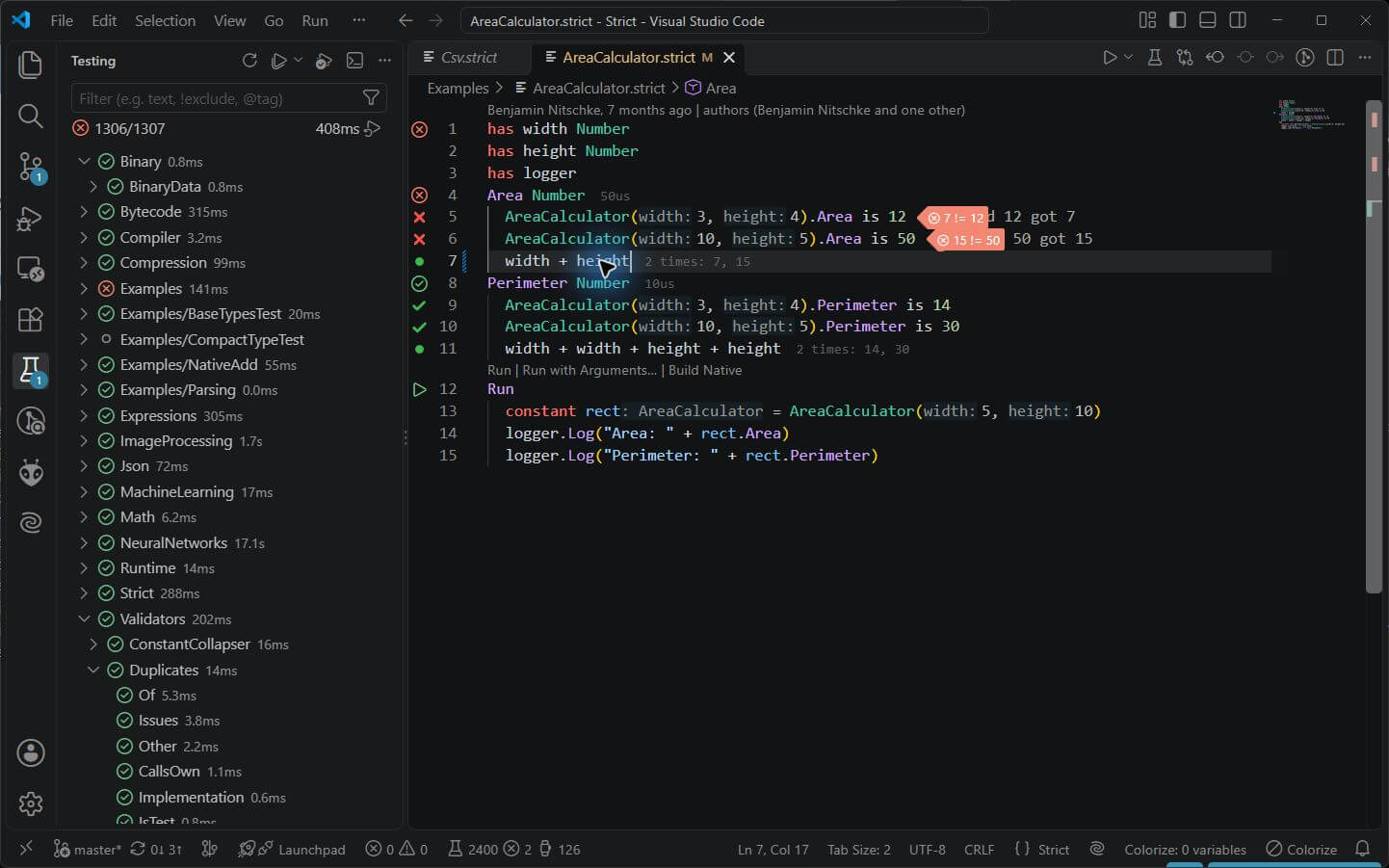
A deliberately changed expression makes the failures visible beside their tests. The example was restored after the capture.
Tests run once
Tests run when the code is compiled, not every time a method is called. Code that is used must have passed its tests. Once they pass, test lines are stripped from the bytecode, so they cost nothing at runtime. Tests are constant expressions, and like every constant expression in Strict they are evaluated once and then optimized away.
The tests also tell the compiler what a method is supposed to do. That's what lets Strict check, replace or even generate code later. For example, it can replace a method with an existing, equivalent one from the base library.
Tests must be fast
Every test should run in a few milliseconds. Slow or external things like files, the network or processes belong behind a trait or a type that can be replaced in tests. Process.strict and Directory.strict are examples: their bodies are implemented by the native runtime, and the code using them is tested with values instead.